MCP Server
polar-flow-server ships a built-in Model Context Protocol server, so any MCP-capable AI assistant (Claude Code, Claude Desktop, and a growing list of others) can query your health data and reason over it:
"How has my sleep trended this month compared to my baseline?" "Should I train hard today?" "Any signs I'm getting ill?"
The server speaks MCP protocol revision 2026-07-28 (stateless streamable HTTP) and still serves older 2025-era clients. It runs inside the main server process — no sidecar, nothing extra to deploy — at:
https://your-server.example.com/mcp
Authentication
Two ways in, and the right one depends on the client:
OAuth sign-in (the "Connect" button)
With BASE_URL set (self-hosted mode), the server is a full OAuth 2.1
authorization server: MCP clients discover it via the standard metadata
documents, register themselves dynamically, and send you through a real
sign-in — your admin login plus a consent screen — instead of pasting keys.
Issued tokens are scoped to the connected user, expire after an hour
(refresh tokens rotate), and every connected app is listed in
Settings → Connected Applications with a one-click revoke.
# .env - the public URL becomes the OAuth issuer
BASE_URL=https://your-server.example.com
API keys (headless / scripting)
The same API keys as the REST API always work, sent as an X-API-Key
header or as a bearer token. Create one in the admin dashboard
(Settings → API Keys). Scoping is identical to the REST API and enforced
before any MCP protocol handling:
- User-scoped keys can only ever read their own user's data. Tools need
no
user_idargument — the key decides. - Service-level keys may pass an explicit
user_idtool argument on multi-user installs, and default to the connected user otherwise.
Rate limits are shared with the REST API (per key, per hour).
Connecting a client
Claude Desktop / claude.ai (OAuth)
Add a custom connector with URL https://your-server.example.com/mcp and
click Connect — your browser opens the server's login, you approve the
consent screen, done. No keys to copy.
Claude Code
# OAuth (with BASE_URL configured): authenticate interactively
claude mcp add polar-health https://your-server.example.com/mcp --transport http

# Or with an API key
claude mcp add polar-health https://your-server.example.com/mcp \
  --transport http \
  --header "X-API-Key: pfk_your_key_here"
Other clients
Any MCP client speaking streamable HTTP works: OAuth via the standard discovery chain, or an API key as a bearer/header if the client supports fixed credentials.
Verify
Ask the assistant something like "use polar-health to summarize how I'm
doing" — it should call get_health_insights and answer with your real
numbers.
Tools
| Tool | What it returns |
|---|---|
get_health_insights |
The one-shot assessment: current metrics vs personal baselines, trends, patterns, anomalies, plain-language observations and suggestions |
get_sleep |
Nightly sleep records: score, stage breakdown, overnight HRV/HR/breathing/skin-temp |
get_recovery |
Nightly recharge (ANS charge, HRV) and cardio load (strain vs tolerance) |
get_activity |
Daily steps, calories, distance, active minutes, activity score |
get_exercises |
Workout history; pass exercise_id for one workout's full detail |
get_biosensing |
One stream per call via metric: spo2, ecg, body_temperature, skin_temperature, heart_rate, alertness, bedtime |
get_baselines |
Personal rolling averages and IQR anomaly bounds per metric |
get_patterns |
Stored pattern analyses (sleep-HRV correlation, overtraining risk, trends) plus a live anomaly check |
trigger_sync |
Starts a background sync from Polar (honours the in-progress guard and Polar rate-limit cooldowns) |
get_sync_status |
Whether a sync is running, the last sync's audit record, current Polar rate-limit state |
Tool descriptions are written for the model — units, semantics, and when to use which tool — so assistants generally pick sensibly without prompting.
Rendered cards (MCP Apps)
In clients that support the MCP Apps extension
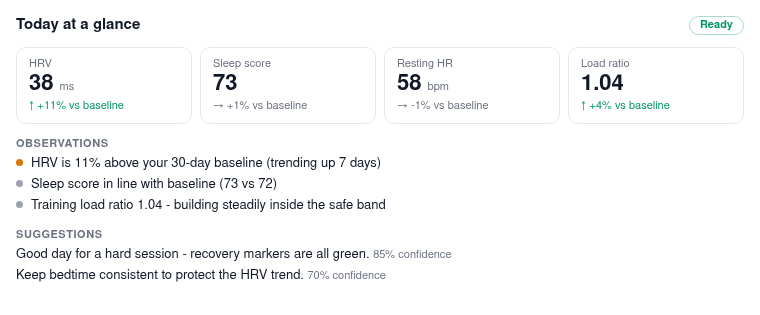
(claude.ai, Claude Desktop, VS Code, and others), get_health_insights
renders a Today at a glance card right in the conversation: current
metrics vs your personal baselines, observations, and suggestions, following
the client's light/dark theme.
 The first time, the client asks permission to
display the app. Clients without Apps support (e.g. Claude Code) simply get
the tool's normal structured result — the card is progressive enhancement,
never the data channel.
The first time, the client asks permission to
display the app. Clients without Apps support (e.g. Claude Code) simply get
the tool's normal structured result — the card is progressive enhancement,
never the data channel.
The tool list order is stable and tools/list carries a one-hour cache
hint (ttlMs), so client-side prompt caches stay warm across calls.
Notes for operators
/mcpsits behind the same security-header middleware as the rest of the app, and is excluded from CSRF (it is API-key authenticated JSON-RPC, not a browser form target).- Unauthenticated requests are rejected at the HTTP layer (401/429) without touching the MCP protocol stack.
- The endpoint works offline/on a LAN like the rest of the server — there are no third-party calls involved.
- Long-running sync is exposed as trigger + poll (
trigger_sync→get_sync_status). When the MCP Tasks extension (SEP-2663) lands in the official SDK, sync will adopt it.